Tally sales order automation for every customer order
OrderDak is order-entry software for Indian distributors, wholesalers and manufacturers who use Tally. It reads the orders your customers send on WhatsApp, by email, as PDFs, Excel sheets and photos, checks each one against your price list, credit limits and stock, and turns it into a Tally sales order your team approves in one click. It is free for your first 3 months; after that you pay only for what you use, at our cost.
No card needed. After 3 months, pay only for what you use.
See OrderDak handle real orders, in under two minutes
A pasted WhatsApp order read in seconds, an order held for its credit limit and released with a reason, a phone photo of a printed order, a duplicate caught, and an approved order ready for Tally. Recorded on a sample company with sample data.
Read the transcript
Your customers send orders on WhatsApp, by email, as PDFs, Excel sheets and photos. Someone types every one into Tally. OrderDak does that work, and checks it.
Every order lands in one inbox, however it arrived. OrderDak reads each one in the background and sorts it: ready to approve, needs review, or not an order at all, like this payment message.
Paste a WhatsApp order, and within seconds it's read: the buyer, the items, the quantities, matched to your own stock items in Tally.
This customer is over their credit limit, so the order waits for you. Every line was matched and checked: rates, stock, pack sizes, duplicate PO numbers, the GSTIN, and IGST because the buyer is in another state.
Release the hold with a reason, and the reason is kept on record. Approve, and it becomes a Tally Sales Order. Import the file in Tally, or let the OrderDak bridge on your Tally PC create it.
Photos and scans of printed orders work too. Anything read from a photo comes to you for a quick check, and OrderDak spotted that this order was already received as an Excel file.
Every step is on record: who read, changed and approved each order, in a log that can't be quietly edited.
Free for your first three months. Then you pay only for what you use. Start at OrderDak dot com.
Ready to try it on your own orders? Start free — 3 months on us
Made for businesses that take orders all day and run on Tally
Distributor and stockist owners
"Orders come in on ten WhatsApp groups and someone types every one into Tally. Some get missed."
Take more orders a day without another person to type them. Every order is in one list, and credit limits are respected.
Order-desk staff
"I copy item names and quantities from chats and PDFs all day, and check rates from memory."
Stop retyping. OrderDak reads the order and you only check the lines it flags, then approve.
Manufacturers selling to dealers
"Dealers send POs in their own formats, and we sometimes enter the same PO twice."
Dealer POs are entered once, at the right rate, with duplicate PO numbers caught before they reach Tally.
Three steps from message to Tally
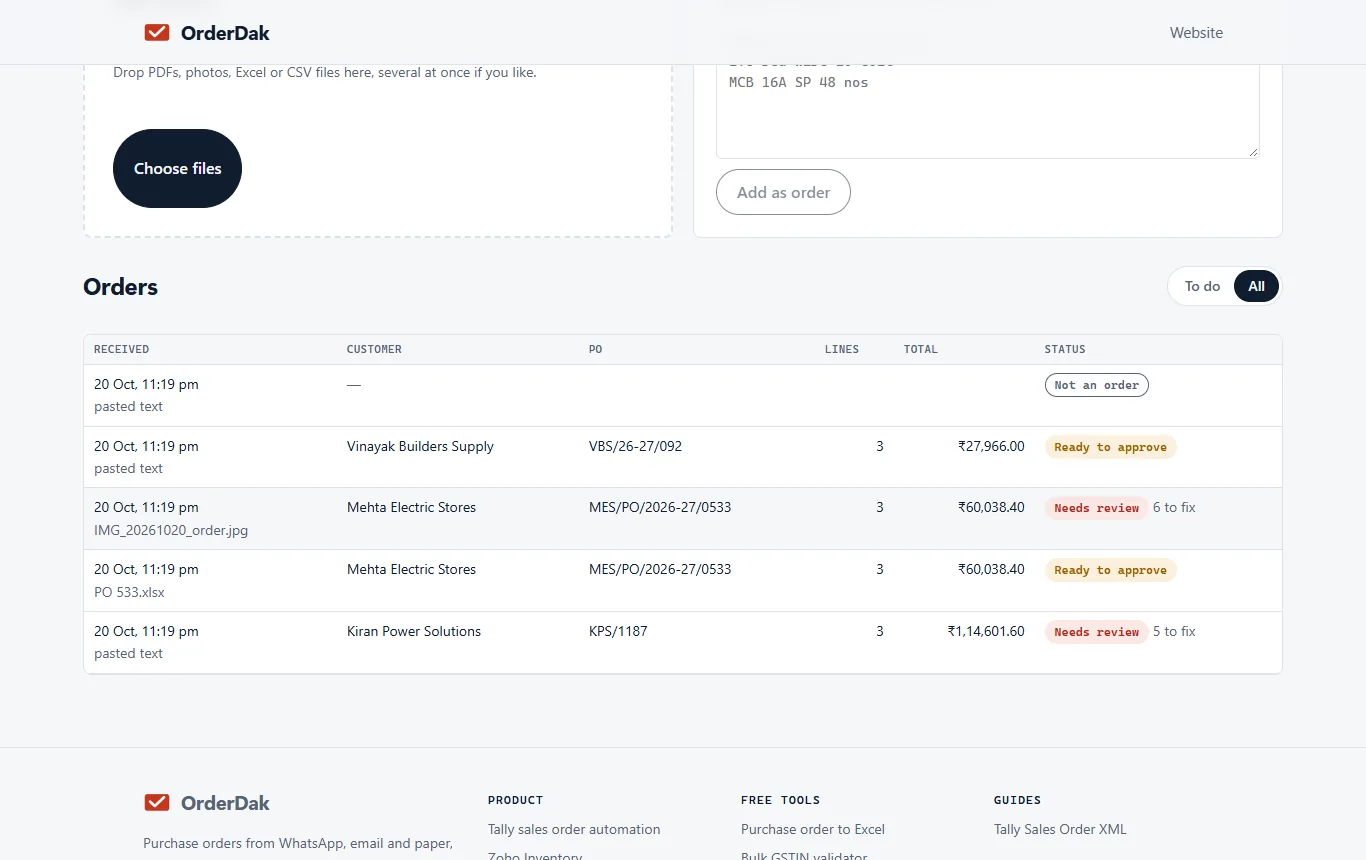
1. Send orders in
Forward order emails to your own OrderDak address, paste a WhatsApp chat, or upload PDFs, Excel sheets and photos of printed orders.
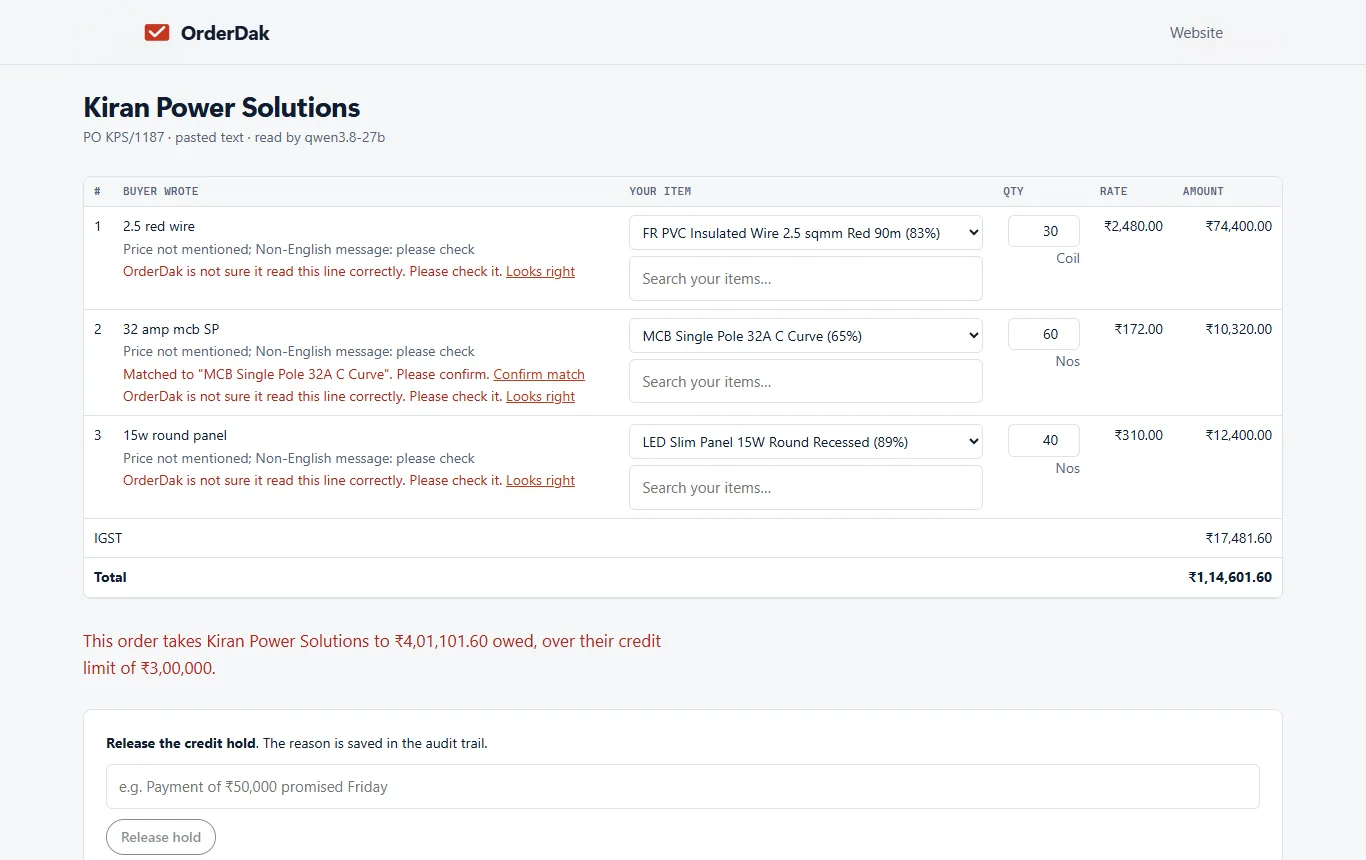
2. Check what OrderDak flags
It reads each order, matches lines to your Tally stock items and checks price, credit, stock, pack size, duplicate PO numbers and GST. Unclear lines are marked, never guessed.
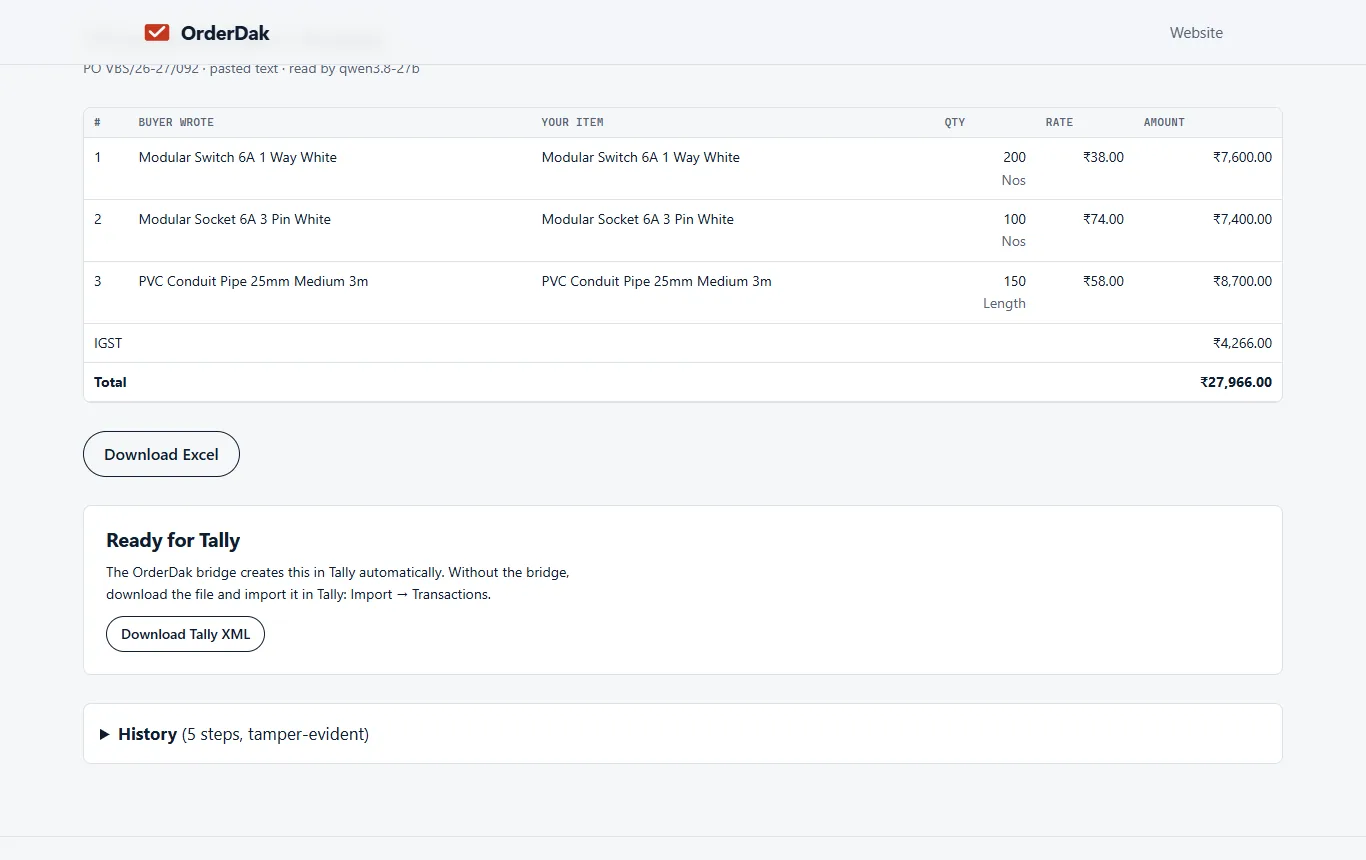
3. Approve into Tally
One click turns a clean order into a Tally Sales Order. Import the file in Tally, or let the OrderDak bridge on your Tally PC create it (beta).
Everything a busy order desk needs
One inbox for every order
Email, pasted WhatsApp text, PDF, Excel, CSV and photos of printed orders land in one list.
AI reading on our own server
Buyer, items, quantities and rates are read in seconds, and every line is checked against the original text.
Matching that learns
Lines match your stock items and customers. Each correction teaches OrderDak that customer's names for your items.
Checks before posting
Party-wise rates, credit limit, stock, pack size, duplicate PO number, GSTIN check digit, and CGST + SGST or IGST.
Tally Sales Orders beta
Download Tally XML, or let the bridge on your Tally PC post orders and sync stock items and customers back.
Busy and Marg import files beta
Approved orders produce that software's import file. Excel export works for any other software.
Buyer confirmations beta
Buyers who ordered by email get a confirmation listing what you accepted and what is short.
A record of every step
Who read, changed and approved each order, in a log that can't be quietly edited.
Not available yet: a direct WhatsApp Business connection, handwritten slips, voice notes, and posting straight into Zoho, Busy or Marg. See all features and what is still in development
Free for your first 3 months. Then pay only for what you use, at our cost — no markup. Monthly plans coming soon.
OrderDak compared with Docs by Ira in TallyPrime
| Docs by Ira (TallyPrime) | OrderDak | |
|---|---|---|
| Price | About ₹1 a page after 100 free pages (est.) | Free for 3 months, then at cost (about ₹0.25 an order, est.) |
| WhatsApp chat text | Files shared from WhatsApp | Pasted or forwarded chats, Hinglish too |
| Excel and email-body orders | PDFs and images | PDF, Excel, CSV, email text, photos |
| Customer's own item names | Mapped in Tally | Learned per customer from corrections |
| Price, credit and stock checks | Draft voucher for review | Checked before the order reaches Tally |
| Software | Tally only | Tally, Busy and Marg files (beta), Excel for any other |
What is OrderDak?
OrderDak is order-entry software for distributors, wholesalers and manufacturers in India. It reads the purchase orders customers send on WhatsApp, by email, as PDFs, Excel sheets and photos, matches them to your Tally stock items and customers, checks price, credit limit and stock, and creates the sales order in Tally Prime. Your team only reviews the orders that need them.
Is it really free?
Yes. Your first 3 months (90 days from sign-up) are free, with everything unlocked and no limit on orders. You don't need a card to start.
What happens after 3 months?
You pay only for what you use, at our cost with no markup, from a prepaid balance you top up with ₹200, ₹500, ₹1,000 or ₹2,000. Reading one order costs about ₹0.25 (est.). We email you on day 75, 85 and 90, before anything changes.
Do I need a card?
No. You sign up with your email and a 6-digit code. You only add money to your balance if you keep using OrderDak after the free 3 months.
Which software does it work with?
Tally Prime 3.0 or later (beta), through an import file or the OrderDak bridge on your Tally PC. Busy and Marg get their own import files (beta), and any other software gets an Excel export. Zoho Inventory is in development.
Can it read Hinglish WhatsApp orders?
Yes. Typed WhatsApp orders in English and Hinglish, including several messages that make one order, are read today. Paste or forward them. A direct WhatsApp Business connection, handwritten slips and voice notes are in development.
Does the AI post orders into Tally by itself?
No. The AI only reads the order. Matching and the price, credit and stock checks are plain rules you control. Orders reach Tally only after they pass your rules or a person approves them.
Is my data safe?
Each company's data is kept apart from every other company's, sign-in uses one-time codes sent to your email, and every change to an order is written to an audit log. Your orders are not used to train AI models unless you choose to allow it.
Who is behind OrderDak?
OrderDak is made by Surge Software Solutions Private Limited in Bengaluru. The founder is Venu Gopal Reddy Muvva.
Can I talk to a person?
Yes. Ask the assistant at the bottom right. If it can't answer, leave your email and the founder replies, usually within 10 hours. You can also write to [email protected].
Stop typing orders into Tally
Free for your first 3 months. No card needed.
Questions? Ask our assistant (bottom right) — it answers 24/7.