Stop typing orders into Tally.
Your customers send orders on WhatsApp, by email, as PDFs, Excel sheets and photos. OrderDak reads every one, checks it against your price list, credit limits and stock, and posts the sales order to Tally. Your team only looks at the orders that need them.
Free during the pilot: no card, no contract.
| Stock item | Qty | Rate | Amount |
|---|---|---|---|
| FR PVC Insulated Wire 1.5 sqmm Red 90m | 20 Coil | ₹1,540 | ₹30,800 |
| MCB Single Pole 16A C Curve | 48 Nos | ₹160 | ₹7,680 |
| LED Bulb 9W B22 Cool Day Light | 200 Nos | ₹62 | ₹12,400 |
| CGST + SGST | ₹9,158 | ||
| Total | ₹60,038 | ||
Sample data: the business, items and prices are invented to show how it works.
See OrderDak handle real orders, in under two minutes.
A pasted WhatsApp order read in seconds, an order held for its credit limit and released with a reason, a phone photo of a printed PO, a duplicate caught, and an approved order ready for Tally. Recorded on a sample company with sample data.
Read the transcript
Your customers send orders on WhatsApp, by email, as PDFs, Excel sheets and photos. Someone types every one into Tally. OrderDak does that work, and checks it.
Every order lands in one inbox, however it arrived. OrderDak reads each one in the background and sorts it: ready to approve, needs review, or not an order at all, like this payment message.
Paste a WhatsApp order, and within seconds it's read: the buyer, the items, the quantities, matched to your own stock items in Tally.
This customer is over their credit limit, so the order waits for you. Every line was matched and checked: rates, stock, pack sizes, duplicate PO numbers, the GSTIN, and IGST because the buyer is in another state.
Release the hold with a reason, and the reason is kept on record. Approve, and it becomes a Tally Sales Order. Import the file in Tally, or let the OrderDak bridge on your Tally PC create it.
Photos and scans of printed orders work too. Anything read from a photo comes to you for a quick check, and OrderDak spotted that this order was already received as an Excel file.
Every step is on record: who read, changed and approved each order, in a log that can't be quietly edited.
We're running free four-week pilots with distributors. Send us your item and customer lists from Tally, and you can be live in an hour.
Built for businesses that take orders all day and run on Tally.
If someone in your office retypes customer orders from WhatsApp, email or PDFs into Tally, OrderDak is for you.
Distributors and stockists
Electricals, hardware, FMCG, paints, building materials and auto parts: dozens of orders a day from retailers and dealers on WhatsApp and phone photos.
Wholesalers and traders
Repeat buyers who write items their own way. OrderDak learns each buyer's names for your stock items.
Manufacturers selling to dealers
Dealer and distributor POs as PDFs and Excel sheets from purchase systems, with PO numbers that must not be entered twice.
Industrial and B2B suppliers
Formal POs by email with GSTINs, delivery dates and rates to check against what you quoted.
For the owner
Orders don't get missed in chats, credit limits are respected, and every order has a record of who did what.
For the order desk
No retyping. Review only the lines OrderDak flags, then approve in one click.
For the accounts team
Clean Sales Orders in Tally with the right party ledger, stock items, GST split and PO number.
For the sales team
Buyers who ordered by email get a confirmation listing what was accepted and what is short.
The order desk, screen by screen.
Real screens from OrderDak, running on a sample company.
Every order in one place
Forwarded emails, pasted WhatsApp chats, PDFs, Excel sheets and photos land in one inbox. Each is read in the background and sorted into ready, needs review, or ignored (payment messages and chit-chat).
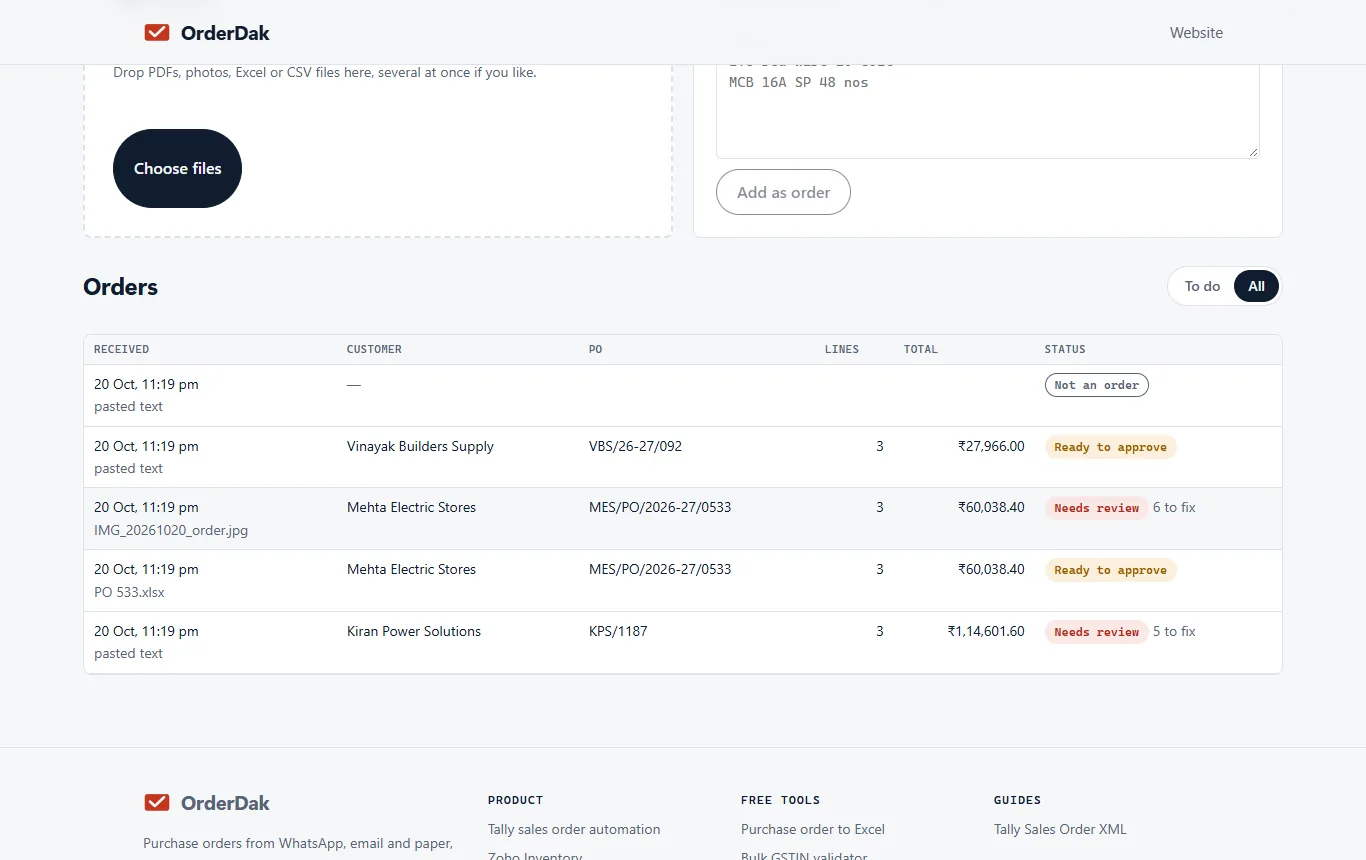
Try the order desk yourself on sample data, no sign-in needed.
Read whatever your customers already send.
No app for your buyers, no portal, no new format. They keep ordering the way they do today.
WhatsApp messages
Typed lists, Hinglish, several messages that make one order. Paste or forward them today; a direct WhatsApp Business connection is in development
Photos and scans
Printed orders and challans, every line marked for a quick check. Handwritten slips are in development
Voice notes (in development)
Hindi and English, transcribed then read like any other order
PDF purchase orders
Digital, or scanned up to 10 pages
Excel and CSV sheets
Whatever columns your customer uses
Email bodies
Orders typed straight into the email, no attachment
From message to voucher in minutes.
Code fetches the order, AI reads it, your rules decide, and every step is logged.
Forward or drop in
Forward order emails to your OrderDak address, paste a WhatsApp chat, or drop in PDFs, Excel sheets and photos.
Read
An AI model reads the order: buyer, items, quantities, rates, dates. Every line is checked against the original message, and unclear lines are marked, never guessed.
Match and check
Lines are matched to your stock items and checked against your rules.
Approve and post
Clean orders are ready to approve in one click; exceptions wait in a review queue. Approved orders become Tally Sales Orders: import the file in Tally, or let the OrderDak bridge on your Tally PC create them (beta).
Confirm
For orders that came by email, the buyer gets an email listing what was accepted, with stock shortages called out. Replies go to you.
The rules your best order-desk person applies, every time.
You choose which checks stop an order and which only warn. Corrections your team makes are remembered for that customer.
- The buyer is matched to the right party ledger by GSTIN, sender or name
- Each line is matched to your stock item, learning how each customer names it
- Rates are checked against your item rates, within the tolerance you set
- The order is checked against credit limit and outstanding
- Stock, pack sizes and duplicate PO numbers are checked
- GSTIN check digit is verified and GST is split into CGST + SGST or IGST
More than a PDF importer.
| Typing by hand | PDF import tools | OrderDak | |
|---|---|---|---|
| PDF and Excel orders | Retyped | Yes | Yes |
| WhatsApp chats | Retyped | Files only | Yes, pasted or forwarded; direct connection in development |
| Photos and scans | Retyped | Often not supported | Printed: yes, every line flagged for a check. Handwriting: in development |
| Customer's own item names | From memory | Manual mapping | Learned per customer |
| Price list, credit and stock checks | From memory | After import | Before posting |
| Reply to the buyer | Manual | No | By email, automatic |
| ERPs | Any | Usually one | Tally now, Excel for any ERP; Zoho next |
Your data stays yours
Each company's data is kept apart from every other's, and your orders are not used to train AI models unless you choose to allow it.
Nothing posts without your rules
The AI reads; it never writes to your ERP. Posting happens only after every blocking rule passes.
Every step on record
Who changed what, when and why, in a hash-chained log you can export for any order.
Live in four steps.
Free during the pilot: no card, no contract.
Book a free pilot
Four weeks, no card, no contract. Tell us how your orders arrive and which software you use.
Share your Tally lists
Export your stock items and Sundry Debtors from Tally, or let the OrderDak bridge on your Tally PC read them.
Send orders the way they come
Forward order emails to your OrderDak address, paste WhatsApp chats, or drop in PDFs, Excel sheets and photos.
Review and approve
The first orders go to review so OrderDak learns your customers' item names. After that, clean orders are one click.
Or write to [email protected].
What is OrderDak?
OrderDak is order-entry software for distributors, wholesalers and manufacturers in India. It reads the purchase orders customers send on WhatsApp, by email, as PDFs, Excel sheets and photos, matches them to your Tally stock items and party ledgers, checks price, credit limit and stock, and creates the sales order in Tally Prime. Your team only reviews the orders that need them. It is made by Surge Software Solutions Private Limited, Bengaluru.
Who is OrderDak for?
Businesses that receive many customer orders a day and type them into Tally by hand: distributors and stockists (electricals, hardware, FMCG, paints, building materials, auto parts), wholesalers, and manufacturers selling to dealers. It helps the owner, the order desk, accounts and the sales team.
How do I start using OrderDak?
Book a free four-week pilot. Share your stock items and customer list from Tally, then forward order emails, paste WhatsApp orders or drop in files. The first orders go to review so OrderDak learns your customers' item names; after that, clean orders are approved in one click.
Can it read Hinglish WhatsApp orders?
Yes. Typed WhatsApp orders in English and Hinglish, including several messages that make up one order, are read today. Paste or forward them; a direct WhatsApp Business connection, handwritten slips and voice notes are in development.
Which ERPs does OrderDak post to?
Tally Prime (3.0 or later, with order processing enabled) today, in beta, and any software through Excel export. Zoho Inventory is next; Zoho Books, Busy, Marg, SAP Business One and Odoo are on the roadmap.
Does the AI post orders into my ERP by itself?
No. The AI only reads the order. Matching, price, credit and stock checks are plain rules you control, and only orders that pass every rule are posted. Everything else waits for one click from your team.
Tally already reads PDFs. Why would I need this?
PDF importers turn a document into a draft voucher. OrderDak also reads pasted or forwarded WhatsApp chats, Excel sheets, photos and scans, learns each customer's names for your items, checks price lists, credit and stock before posting, and emails the buyer a confirmation. Handwriting, voice notes and a direct WhatsApp connection are in development.
How does it connect to Tally on my office PC?
A small OrderDak app runs on the PC where Tally is open. It talks to Tally on that PC only and connects out to OrderDak over HTTPS. Nothing from the internet can reach your Tally.
What happens to my data?
Your orders are used only to run OrderDak for you, kept separate from every other customer's data, and not used to train AI models unless you choose to allow it. Every step on every order is written to an audit log that cannot be edited without detection. Before launch we publish the full list of services that process your data and where they are.
What does it cost?
It is free during the pilot: no card, no contract. We are setting prices together with our first distributors, and nothing is ever charged without your agreement.